Copy blocks: Difference between revisions
mNo edit summary |
m (→Next Steps) |
||
| Line 31: | Line 31: | ||
===Next Steps=== | ===Next Steps=== | ||
To manually add blocks from Easy Content Builder to Product Information, follow these steps: | |||
* In the '''Product Information''' section, hover between existing blocks and click '''Add Block'''. | |||
* In the popup, go to the '''Apps''' tab and select the Easy Content Builder blocks you wish to add. | |||
{{Note|'''IMPORTANT''': If you're including a section in the core product information, skip adding Section Settings and just add the desired Block.|reminder}} | |||
Revision as of 10:23, 28 July 2025
We assume you're already familiar with adding a new section using Easy Content Builder. If you’re new, check out How to Add New Section.
This guide uses the Shopify product page as an example. You’ll learn how to copy blocks from a section and paste them into the Product Information section.
Move & Copy Blocks
Step 1: Add a Section to the Product Template

- Go to Apps > Easy Content Builder > Browse Sections.
- Find the section you want to add.
- Click Add to Template, then specify the page and click Submit
- You’ll be taken to the Theme Editor where the new section will appear.
Step 2: Copy Blocks to the Product Information Section
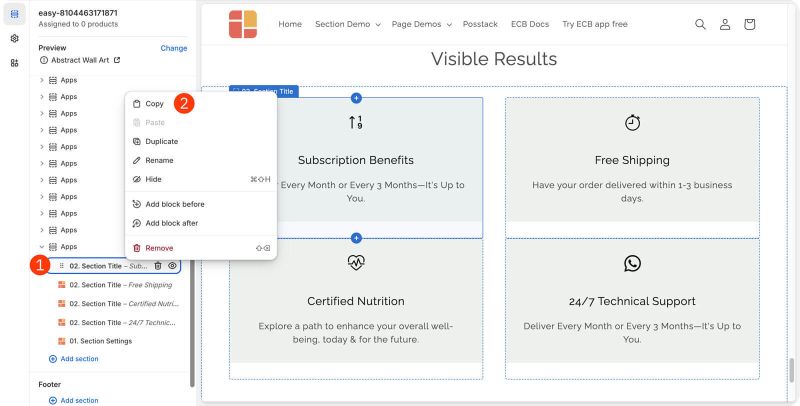
- Right-click the block you want and select Copy
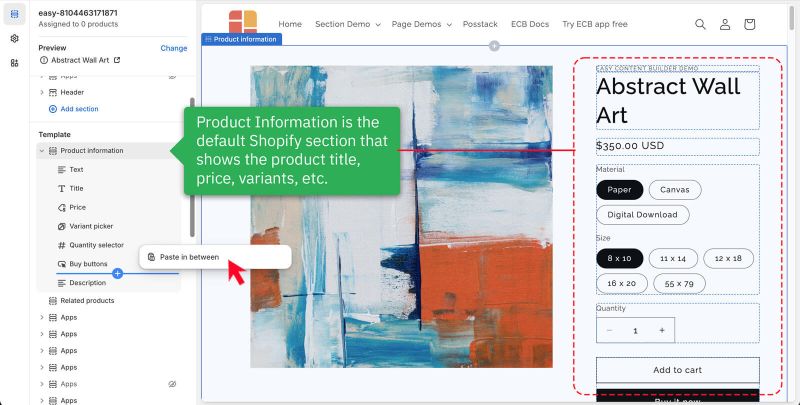
- Scroll to the Product Information section, right-click between the existing blocks, and click Paste in Between.
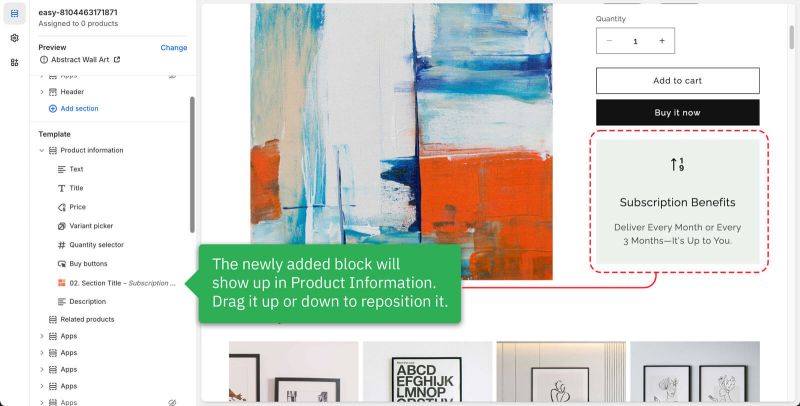
- The new block will now be added. You can adjust its position by dragging it up or down.


Step 3: (Optional) Remove the Section from Step 1

If you’re satisfied with the new blocks, you can remove the section you added in Step 1.
Hover over the Apps title and click the Remove icon to delete the whole section or hover over individual blocks and click the Remove icon to delete them one by one.
Next Steps
To manually add blocks from Easy Content Builder to Product Information, follow these steps:
- In the Product Information section, hover between existing blocks and click Add Block.
- In the popup, go to the Apps tab and select the Easy Content Builder blocks you wish to add.